An enterprise AI knowledge base lets staff or customers ask a question in plain language and get an answer drawn from your own SOPs, product manuals, support FAQs and regulations, with a note on exactly which document and section it came from. The most common way to build one is RAG (retrieval-augmented generation): the AI looks things up first, then writes the answer. No model retraining is needed, and when a document changes, the answers change with it. The build runs in six steps: audit and clean the data, chunk and index it, retrieve, answer with sources, enforce permissions, then evaluate and update. Success usually depends less on the model than on how clean the documents are and whether permissions are enforced at retrieval time. With PeakQi's standard modules, the first phase can go live in as little as 10 working days, with cost split into setup, monthly and usage fees and quoted to your data volume and scope.
What is RAG? A plain-language explanation
RAG is an open-book exam. Before answering, the AI flips through your company's material, finds the few passages that matter and answers from those. An AI without RAG is sitting a closed-book exam: it only knows what it saw in training, has no idea you changed your returns policy last week, and may confidently make something up.
The approach comes from "Retrieval-Augmented Generation for Knowledge-Intensive NLP Tasks" by Lewis et al., published in 2020 and accepted at NeurIPS 2020. The paper calls what a language model stores internally its "parametric memory" and an external, searchable document store "non-parametric memory." RAG combines the two: the model handles understanding and wording, the document store supplies the facts. The paper also notes that explaining where an answer came from and updating a model's knowledge were open problems. Those are exactly the two things RAG is good at in practice: answers can cite sources, and knowledge is updated by editing documents.
Each question runs through four moves:
- Understand the question: "A customer bought this 20 days ago and wants to return it. Can they?"
- Retrieve: the system pulls the most relevant passages, say clause 3 of the returns policy and item 12 in the support script.
- Generate: the AI writes an answer based only on those passages.
- Cite: the answer lists the document and section so anyone can check it.
RAG vs fine-tuning vs asking a general AI
The difference is where your company knowledge lives. Ask a general AI and the knowledge isn't in the system at all. Fine-tuning trains it into the model. RAG keeps it in a document store and looks it up for every answer. For most business knowledge bases, RAG is the right starting point because documents change, answers need sources, and access needs controlling.
| Asking a general AI | Fine-tuning | RAG knowledge base | |
|---|---|---|---|
| Where knowledge lives | Not in the system; staff paste it in | Trained into model weights | In a document store, retrieved per answer |
| When documents change | Paste again every time | Rebuild training data and retrain | Update the document, re-index |
| Can it cite sources? | No | Hardly | Yes, down to the document and section |
| Access control | Relies on staff discipline | Can't be separated once learned | Filtered by user role at retrieval |
| Main risk | Confidential data in personal accounts, version chaos | Cost, stale knowledge, still makes things up | Messy data or poor chunking gives wrong answers |
| Best for | Personal lookups, drafting | Fixed tone, special formats, jargon | SOPs, manuals, support FAQs, regulations |
Fine-tuning has its place. It is good at shaping how a model talks, such as a fixed reply format or industry vocabulary. But for keeping the AI up to date on facts, RAG is cheaper and easier to maintain. The two can also be combined.
One option often gets overlooked: with very little data, you can skip retrieval. Anthropic's "Introducing Contextual Retrieval" (September 2024) notes that a knowledge base under roughly 200,000 tokens (about 500 pages) can simply go into the prompt in full. A company with one 30-page staff handbook doesn't need RAG yet.
Which data and use cases suit an AI knowledge base
Good candidates share three traits: people ask about it often, the answer is written down, and a wrong answer costs something. The four most common:
- SOPs and internal policies: leave, expenses, shipping, opening and closing a store. New hires ask constantly; veterans get interrupted constantly.
- Product manuals and specs: model differences, warranty terms, installation steps. Sales and support dig through several PDFs before every answer.
- Support FAQs: curated questions, standard replies, return rules. These can be connected to a LINE Official Account to answer customers directly; see connecting LINE AI support to your CRM.
- Regulations and contract terms: labor rules, industry regulations, contract templates. Here every answer must point back to a clause number.
Hold off if the answers aren't written down anywhere and live only in senior staff's heads; documents contradict each other and nobody knows which is current; or the questions are really lookups of live numbers (stock, order status). That calls for a database integration, not a knowledge base.
In Zhanggui AI, a system PeakQi delivered for restaurants, the front-of-house assistant works on the same idea: it answers common questions from the menu and house rules the owner uploads. When a hard fact like a price or date is missing, it asks the owner instead of filling the gap itself.
Six steps to build an enterprise RAG system
The rule is sort out the data first, then worry about the model. The six steps are data audit and cleanup, chunking and indexing, retrieval, answers with sources, permissions, and evaluation and updates.
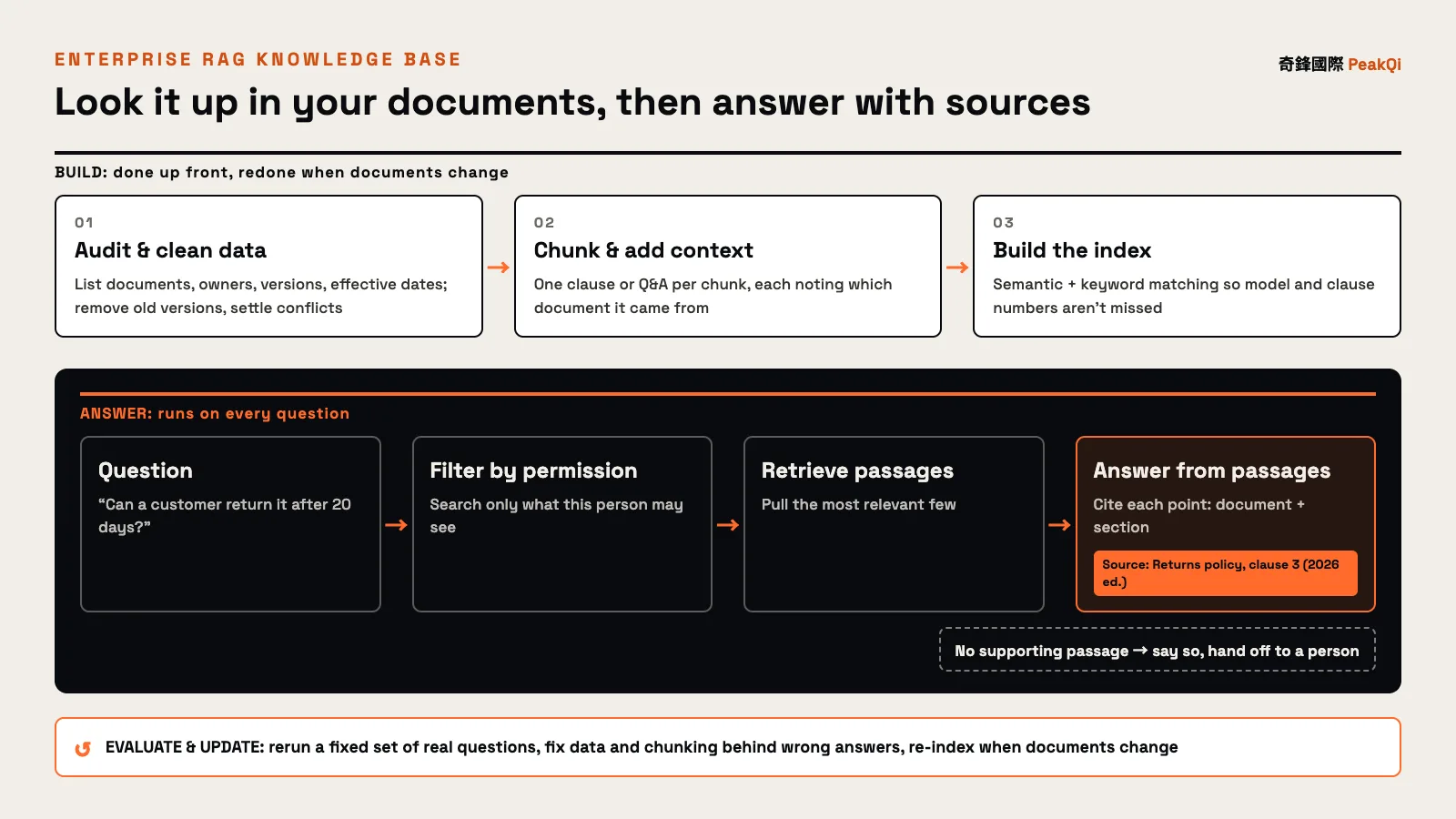
- Audit and clean the data: list the documents to include, with owner, version and effective date. Remove old versions and duplicates, and have a person decide which source wins where they conflict. This step is hard to hand off entirely, because only you know which version is right.
- Chunk and index: split long documents into passages (one clause or one Q&A per chunk, for example) and index each one. Chunks that are too long drag in irrelevant text; too short and they lose context. Anthropic's Contextual Retrieval adds a short line to each chunk explaining which document it is from and what it covers before indexing. In their tests, the share of cases where the correct passage was missing from the top 20 results fell from 5.7% to 3.7% (35% fewer failures), to 2.9% when combined with keyword matching (BM25, 49% fewer), and to 1.9% with reranking added (67% fewer).
- Retrieve: find the most relevant passages for each question. Semantic matching alone tends to miss exact strings like model numbers and clause numbers, so in practice semantic and keyword matching are used together.
- Answer with sources: instruct the AI to answer only from the retrieved passages and cite each point. If there is no supporting passage, it should say so and route the question to the right person.
- Permissions: decide which documents each person can search, by department, seniority, and internal versus external use. Filtering has to happen at retrieval, not after the AI has already answered.
- Evaluate and update: test regularly with real questions, re-index whenever a document changes, and fix the data or chunking behind every wrong answer.
For the wider picture starting from the process audit, see how to start AI adoption.
Four common pitfalls
When a knowledge base goes wrong after launch, the cause is rarely that the AI isn't smart enough. It is usually one of these four.
- Stale data: an old SOP is never removed, so the AI quotes the old rule. Tag every document with version, effective date and owner, drop old versions from the index on revision, and show the version date in the citation.
- Permission leaks: everything goes into one store and store staff can surface the pay policy or contract values. Whatever the AI can see, it may repeat, so enforce access at the retrieval layer and keep customer-facing and internal knowledge bases separate.
- No sources: the answer sounds reasonable but nobody knows what it rests on, and errors can't be traced. Every answer should link back to the original text. In the appraisal review system PeakQi built at the New Taipei AI hackathon, every calculation cites the article of the appraisal regulations or the page of the operations manual it rests on, so reviewers can check it in one click.
- PDF tables and scans: when PDF tables are extracted as text, rows and columns often scramble, and price lists and spec sheets suffer most. Scans also need text recognition first. Turn key tables into spreadsheets or a database and look values up directly; leave arithmetic to code, not the language model.
How to measure results and estimate cost
Evaluate two things separately: did it find the right passage (retrieval) and did it answer correctly from that passage (generation). If you only track user satisfaction, you can't tell whether a failure came from the data, the retrieval or the answer.
Before launch, pull a set of real questions from support logs and internal chats, mark the correct answer and the document it should cite for each, and keep it as a fixed test set. Rerun it after every change to data or settings and track:
| Metric | What it checks |
|---|---|
| Retrieval hit | Was the correct passage among the results? |
| Answer accuracy | Does the answer match the reference answer? |
| Citation accuracy | Does the cited source actually support the answer? |
| Appropriate refusal | For questions the documents don't cover, did it say so and hand off? |
| Handoff rate | Tracked weekly after launch to see which topics it can't answer |
On cost, PeakQi uses the same three-part structure as any AI rollout: a one-time setup fee (data audit and cleanup, chunking and indexing, permissions, integration and testing), a platform monthly fee (system use and upkeep, with standard text AI usage included), and AI usage fees for high-cost image and video generation, billed by use. Customer-facing knowledge answers usually start from plan A, "Capture inquiries," on our pricing page; a large internal knowledge base with complex permissions is scoped separately. Everything is quoted to scope.
What pushes a knowledge base quote up:
- Data volume and mess: many documents, tangled versions, heavy cleanup or migration of historical data.
- Formats: scans, images and complex tables take more work than plain text.
- Permission roles: more departments and levels mean more permission design and testing.
- Data sources: documents spread across cloud drives, existing systems and LINE Official Accounts each need their own integration.
- Update frequency: data that changes daily needs automatic sync.
On timing, the first phase of standard modules can go live in as little as 10 working days; heavy cleanup, migration or cross-department permissions are scoped separately. For how the three cost parts break down and what makes projects expensive, see AI automation cost and timeline. If you also want the AI to act (look up orders, fill in forms), that moves into AI agent territory. The systems we have delivered are in our case studies. If you'd like to know which of your documents to turn into an AI knowledge base first, let's set up a time to talk.
Frequently asked questions
Q: How is RAG different from uploading files to ChatGPT? Uploading files works for one person's ad-hoc questions, but the files end up scattered across individual accounts with nobody managing versions or access. An enterprise RAG knowledge base keeps one maintained set of documents, controls who can search what, cites a source for every answer, and can be connected to LINE or internal systems for many users.
Q: Will an AI knowledge base make up answers? The risk can't be eliminated, but it can be cut sharply: answer only from retrieved passages, cite every point, say "not found" and hand off when there is no support, and check regularly against a fixed test set. Customer-facing replies can also go through a review queue first.
Q: How organized does our data need to be before we start? Not completely. Pick the area where questions cluster, such as support FAQs or a single SOP, confirm which version is current and who owns updates, and start there. Add other documents once the first scope proves itself.
Q: We don't have many documents. Do we need RAG? Not necessarily. Anthropic noted in 2024 that a knowledge base under roughly 200,000 tokens (about 500 pages) can go into the prompt in full. If you have few documents that rarely change, start simple and move to RAG once documents grow or you need access control.
Q: How long does it take to build an enterprise AI knowledge base? With PeakQi's standard modules, the first phase can go live in as little as 10 working days. Heavy data cleanup, migration or multi-department permissions are scoped separately. Expect a few weeks after launch of refining data and chunking based on real questions.
By the PeakQi team. The definition of RAG draws on Lewis et al., "Retrieval-Augmented Generation for Knowledge-Intensive NLP Tasks" (NeurIPS 2020); retrieval failure figures come from Anthropic's "Introducing Contextual Retrieval" (September 2024). Cost structure and timelines describe PeakQi's own pricing and method, and other vendors may work differently; case details are as published on our case studies pages. Published 2026-11-16.