There are three ways to get an AI chatbot for your business: subscribe to a SaaS tool, assemble one yourself on a no-code platform, or have a partner build it for you. The real difference is not how smart the AI is, but who is responsible for keeping its answers right. Every option spends money on the same five items — setup, monthly fees, AI usage, integrations and upkeep — just packaged differently, so compare quotes line by line. Before launch, prepare your FAQs, price lists, policies and handoff rules; after launch, track answer rate, handoff rate, resolution rate and complaints. On PeakQi's standard modules, phase one can go live in as little as 10 working days, priced as setup, monthly and usage fees scoped to your needs.
Three ways to build an AI chatbot, and who each one suits
Each option answers a different question. A SaaS tool answers "I just need something that handles common questions." A no-code platform answers "I want to wire AI into LINE, forms and spreadsheets myself." A custom build answers "Our process is specific, and we need someone to build it around that process and keep it running."
| SaaS tool | No-code platform | Custom build | |
|---|---|---|---|
| Best for | Simple, repetitive questions | Teams with someone who can own the logic | Steady inquiry volume, existing systems to connect, no in-house upkeep |
| Time to launch | Fastest; often same-day trial | Days to weeks, depending on the flow | PeakQi standard modules: from 10 working days; large builds from about six weeks |
| How much you can change | Only what the vendor exposes | Almost everything, by yourself | Designed to your needs; changes are scheduled with the vendor |
| When the AI can't answer | Depends on the product | You build the handoff yourself | Handoff rules are a deliverable |
| Where data lives | Vendor servers; export depends on plan | Depends on platform and hosting | Per contract — confirm separate storage and export before signing |
| Cost shape | Predictable monthly subscription | Platform fee + AI usage + your own time | Setup + monthly + usage |
The short version: one clear task, start with SaaS; someone who can maintain it, try no-code; a chatbot that has to plug into your sales flow with nobody to look after it, go custom. For the upkeep trade-offs, see n8n vs. SaaS vs. a custom AI platform. If you want the bot to take actions rather than just answer, read the AI agent development guide.
The five items behind AI chatbot cost
Whichever route you take, the money goes to the same five places:
- Setup — discovery, knowledge base cleanup, scripts and flow configuration, testing. With SaaS you mostly do it yourself; with a custom build it is a one-time project fee.
- Monthly fee — the platform, hosting and admin console. SaaS is usually tiered by plan, seats or conversation volume; custom builds usually bundle upkeep.
- AI usage — every answer calls a language model. Some plans include standard usage; others bill per use. On no-code platforms you typically pay the model provider directly.
- Integrations — connecting a LINE Official Account, your website, booking system or CRM. This is the most underestimated item: whether the other system has an API, and how well it is documented, changes the effort dramatically.
- Upkeep — knowledge updates, script tuning, fixes after model or platform changes. With SaaS the vendor maintains the product and you maintain the content; with no-code it is all on you, hidden in staff time.
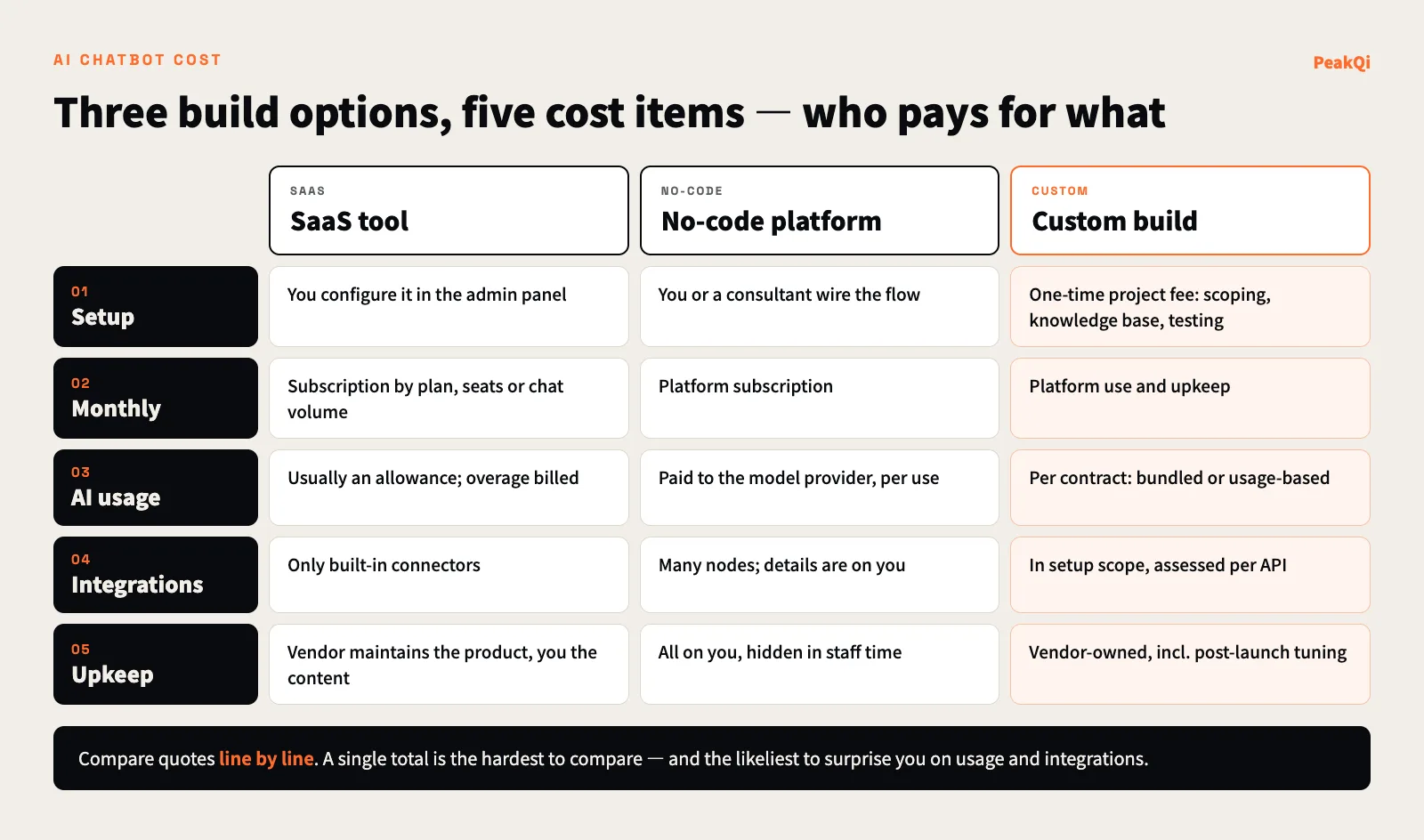
At PeakQi we fold these five items into three: a setup fee (phase-one configuration, data cleanup and integrations), a monthly fee (platform, upkeep and standard text AI usage) and usage fees for high-cost image and video generation, quoted according to the modules and integrations you need. Details are on our pricing page and in AI automation cost and timeline. The quote to be wary of is a single total: ask where each of the five items sits, so you know what happens to the bill when you exceed an allowance, add an integration or change the flow.
Customer service chatbot development: process and timeline
The right order is scope first, knowledge second, AI tuning last. Projects that start by picking a model and building a demo tend to fall apart once real questions arrive.
| Step | What happens | Output |
|---|---|---|
| 1. Scope | List the question types the bot handles, the ones it must not, and when to hand off | Scope and handoff rules |
| 2. Knowledge | Collect Q&A, prices and policies; confirm which version is current | Approved knowledge base |
| 3. Build and connect | Configure scripts, connect LINE or the website, connect customer records | First testable version |
| 4. Test and calibrate | Replay past real questions; fix wrong answers and missed handoffs | Launch version |
| 5. Tune after launch | Review logs and metrics weekly; add knowledge, adjust thresholds | Change log |
On PeakQi's standard modules, phase one runs: Day 0 sign and hand over data; Days 1–4 knowledge base and scripts; Days 5–7 internal testing and simulated chats; Days 7–10 calibration; Day 10 go live. Custom integrations, data migration and cross-team permissions are scoped separately; full vertical platforms start around six weeks. The tuning weeks after launch matter — make sure they are inside the scope before you sign. The full approach is on our method page.
What to prepare before development
How well a chatbot answers depends mostly on what you give it. Have these six things ready and both the timeline and the quote get more accurate:
- FAQs with approved answers — gathered from support and sales, one version per question.
- Prices and packages — each with an effective date; retire old price lists entirely.
- Business rules and policies — opening hours, booking rules, returns, payment methods.
- Real past conversations — with personal data removed, used to test for wrong answers.
- Handoff rules — what must go to a person, to whom, and what happens after hours.
- A do-not-answer list — individual quotes, medical or legal judgments, unannounced promotions.
If your documents are many and messy, start with how to build an enterprise AI knowledge base, which explains how to make the bot answer only from approved documents, with sources.
Four metrics to track after launch
Look at four numbers at least weekly, together — any one of them alone will mislead you:
| Metric | How to calculate | How to read it |
|---|---|---|
| Answer rate | Conversations where the bot gave an answer ÷ all conversations | Low means gaps in knowledge; very high is worth spot-checking for forced answers |
| Handoff rate | Conversations passed to a person ÷ all conversations | Lower is not automatically better — the right ones must be handed off |
| Resolution rate | Conversations with no follow-up question and no need for a person ÷ all conversations | The closest proxy for "it actually helped" |
| Complaints and corrections | Complaints about bot answers, plus answers a person had to correct | One wrong-price complaint hurts more than ten unanswered chats |
In practice, sample a batch of conversations every week, add the questions it got wrong to the knowledge base, and write missed handoffs into the rules. Chatbots get better through this routine, not by switching to a pricier model.
Four common pitfalls: hallucination, wrong prices, no human handoff, data leaks
Hallucination. When a language model can't find an answer, it may invent a plausible one. Make the bot answer only from approved knowledge, cite the source, and say "I don't know" and hand off when nothing matches.
Wrong prices or policies. This is the expensive one. In February 2024, British Columbia's Civil Resolution Tribunal ruled against Air Canada in Moffatt v. Air Canada. The airline's website chatbot told a passenger he could claim a bereavement fare retroactively within 90 days of ticketing; the actual policy excluded requests made after travel. The tribunal held that the chatbot was part of Air Canada's website and the airline was responsible for all information on it, whether from a static page or a chatbot, and awarded roughly CAD 650 in fare difference plus interest and fees (Torkin Manes analysis, 2024). The amount was small; the principle is not: what your bot says, your company owns. Prices, promotions and refund terms should be read from a price table or handed to a person — never improvised by the model.
No human handoff. A Gartner survey published in July 2024 (5,728 customers surveyed in December 2023) found that 64% of customers would prefer companies not use AI for customer service, and 53% would consider switching to a competitor over it. The top worry was that it would become harder to reach a person, followed by job displacement and wrong answers. Gartner's advice: make clear that the AI will connect customers to a person when needed, and carry the conversation over (Gartner press release, 2024-07-09). Handoff is not a fallback; it is a core feature.
Data leaks. A chatbot touches names, phone numbers and orders. Confirm where the data is stored, whether it is used to train models for other customers, whether the bot can only reach the data it needs, and whether a cleverly worded prompt can coax internal information out of it. If those four answers are vague, the bot is not ready to launch.
Seven questions to ask an AI chatbot vendor
What matters is not which model they use, but whether they can spell out boundaries, handoff and cost:
- In the first meeting, do they ask about your process and common questions, or start with a feature demo?
- Where do setup, monthly, AI usage, integrations and upkeep each sit? What happens above the allowance?
- What does the bot base its answers on? Where do prices and policies come from?
- Who gets the handoff? What does the customer see? Does the conversation history go with it?
- Is every answer logged for review? After launch, who watches the metrics and updates knowledge?
- Where is customer data stored, is it used for training, and how is it exported when the contract ends?
- Can you pilot one flow first? What are the adjustment and termination terms?
Vendors with concrete answers to all seven have usually shipped real systems. A fuller checklist is in how to choose an AI automation partner, and systems we have delivered — such as a real-estate AI assistant on a LINE Official Account — are on our cases page. If you want to work out which route fits your customer service, let's find a time to talk.
Frequently asked questions
Q: How much does an AI chatbot cost? It depends on the route and the scope. SaaS is a predictable monthly subscription; custom builds are usually setup plus monthly plus usage, driven by question types, integrations and the handoff flow. A total quoted before anyone looks at your process is not worth much.
Q: Is a SaaS tool enough? For opening hours, directions and common questions, usually yes. Once the bot needs to look up orders, book appointments, write customer records into a CRM or follow a strict handoff process, consider a no-code platform or a custom build.
Q: How long does chatbot development take? SaaS can usually be trialled as soon as you sign up. For custom work on PeakQi's standard modules, phase one can launch in as little as 10 working days; custom integrations and cross-team permissions are scoped separately, large builds start around six weeks, and a few weeks of calibration follow launch.
Q: Does it have to run on LINE? No — a website, a LINE Official Account or Facebook all work; pick where your customers already ask. In Taiwan many small-business inquiries arrive on LINE: see the LINE chatbot guide and connecting LINE AI support to a CRM.
By the PeakQi team. The Air Canada case is cited from a law-firm analysis of the February 2024 BC Civil Resolution Tribunal decision; the customer survey is from a Gartner press release (July 2024). Cost structure and timelines follow PeakQi's pricing and method pages and may differ from other vendors; no invented market-average prices are used. Published 2026-11-16.