A LINE chatbot lets a LINE Official Account answer customers automatically when the shop is too busy to. There are three common kinds: the built-in auto-response message (any incoming message gets the same fixed reply), keyword replies (a set reply fires when the customer types a configured keyword), and an AI chatbot that understands what the customer means. What separates them is whether they cope with questions phrased in different ways, and whether they can look things up and record leads. There are three ways to build one: configure it in the Official Account manager, use a third-party tool, or build a custom integration on the LINE Messaging API. On cost, under LINE Taiwan's plans effective November 1, 2026, replies, auto-responses and AI auto-responses do not count toward your message quota; what you pay for is broadcasts and push messages. The most common mistakes are having no human handoff, pushing too often and getting blocked, and never updating the answers after launch.
What is a LINE chatbot? Three ways to reply
The difference fits in one line: auto-response ignores what was said, keyword replies match the exact words, and an AI chatbot reads the meaning.
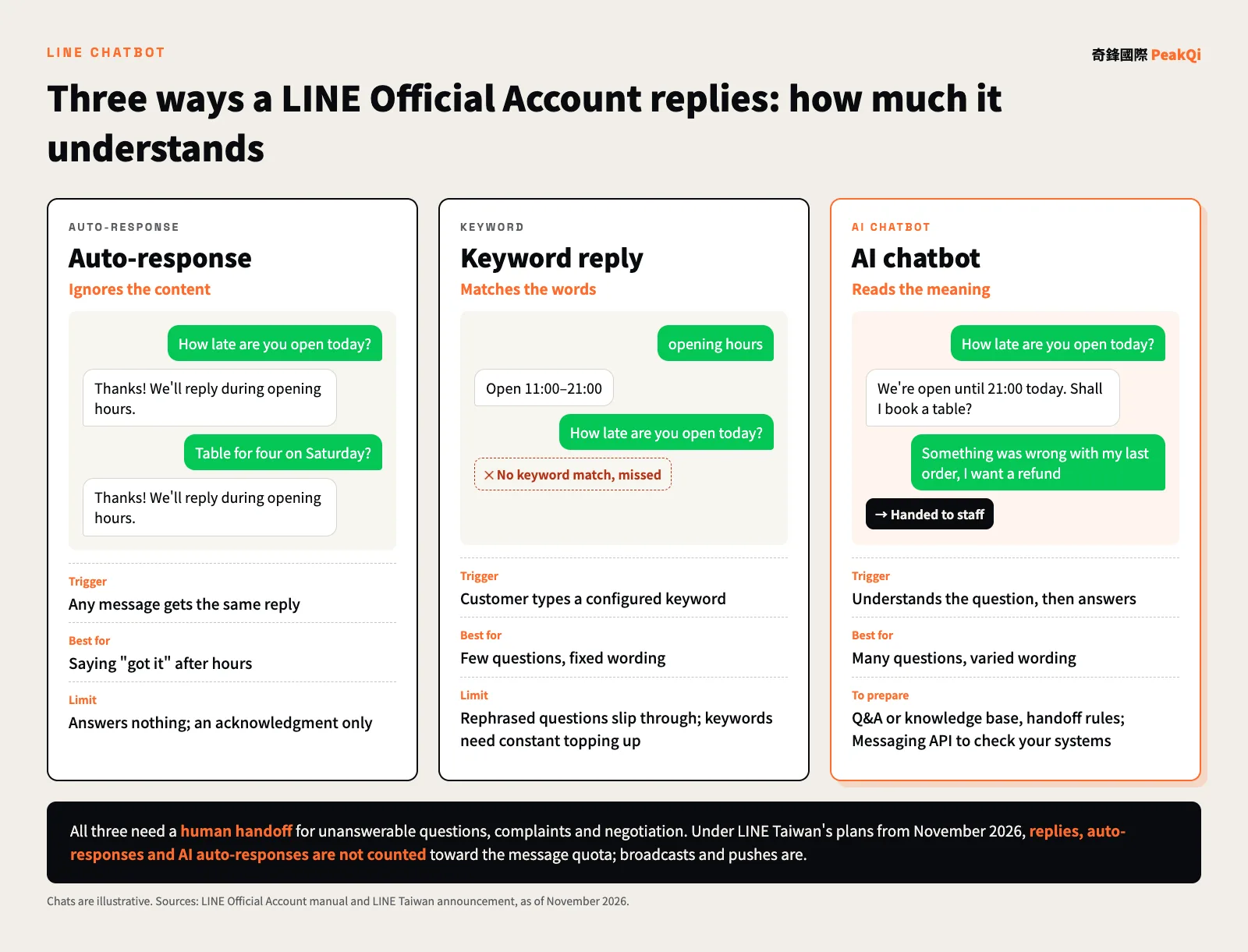
- Auto-response message: whatever the customer sends, they get a preset reply such as "Thanks, we'll get back to you during opening hours." It is the easiest to set up but works only as an acknowledgment.
- Keyword reply: in the Official Account manager you attach keywords to a reply, and it goes out when a customer types them. According to LINE's manual, a keyword match takes priority over other auto-responses. The catch is that customers don't type your keywords: "what time do you open," "are you open today" and "opening hours" are three different things to the system.
- AI chatbot: copes with rephrased questions. The Official Account manager now includes a built-in AI chatbot (beta) that answers from Q&A pairs the business writes (up to 100). If the bot needs to check a booking system, save leads or read a full product catalog, you connect your own AI system through the Messaging API.
| Auto-response | Keyword reply | AI chatbot | |
|---|---|---|---|
| Trigger | Any incoming message | A configured keyword | Understanding the question |
| Rephrased questions | Same reply every time | Missed | Handled |
| Look up data, record leads | No | No | Built-in version answers from Q&A; custom integration can |
| Setup effort | Lowest | Low, but keywords need constant topping up | Q&A or knowledge base to prepare |
| Best for | After-hours acknowledgment | Few questions, fixed wording | Many questions, varied wording |
What a LINE chatbot can do for a business
For a shop or small business, a LINE chatbot is most useful for five jobs: answering FAQs, taking bookings and reservations, handling lookups, capturing leads, and handing off to a person when it can't decide. The first three save time; the last two decide whether customers slip away.
- FAQs: opening hours, address and parking, prices, payment methods, return policies. These come up every day with fixed answers, so they are the best place to start.
- Bookings and reservations: a customer says "four people, Saturday evening," and the bot confirms date and party size, offers open slots or links to an online booking page. Writing the booking into your reservation table needs an integration with that system.
- Lookups: order status, loyalty points, remaining spots. Lookups always need a connection to your systems; the manager settings cannot do this.
- Lead capture: once a customer leaves a name, phone number and need, the bot turns it into a customer record the team can follow up on the next day. Taking this all the way into a CRM is covered in connecting LINE AI support to a CRM.
- Human handoff: negotiation, complaints, special requests and anything the bot isn't sure about go to staff. LINE's response settings let manual chat run alongside auto-responses and the AI chatbot (LINE manual); the handoff conditions and alerts need to be designed up front.
The real-estate AI assistant built by PeakQi combines all five: connected to the LINE Official Account, it answers listing questions and books viewings automatically, while negotiation and closing stay with the agent.
Three ways to build: manager settings, third-party tools, custom Messaging API
Which route to take depends on whether the bot needs to touch your data. If it only answers fixed questions, the manager settings are enough. If it has to check orders, save leads or connect to existing systems, you need the Messaging API.
| Official Account manager | Third-party tool | Custom Messaging API build | |
|---|---|---|---|
| What it can do | Auto-response, keywords, AI chatbot (beta), rich menu | Depends on the tool; usually a shared inbox, tags, marketing automation | Connects to anything: bookings, membership, CRM, knowledge base |
| Coding needed | No | Usually not | Yes, or hand it to a development partner |
| Cost structure | LINE Official Account plan | Plan fee plus tool subscription | Plan fee plus build and upkeep |
| Flexibility | Lowest | Medium, limited by the tool | Highest |
| Best for | Getting started, simple questions | Multi-agent support, segmented marketing | Unusual processes, existing systems to connect |
Technically, the Messaging API works like this: when a customer sends a message, LINE delivers the event to your server (a webhook), your system decides what to say, and it replies through the reply API. The LINE Developers documentation is the authority on the details. For choosing between custom builds, workflow tools like n8n and packaged software, see n8n vs SaaS vs a custom AI platform; for what drives build cost, see what AI chatbot development costs.
LINE Official Account plans and message fees: what you actually pay for
The key distinction is simple: replying to customers is free; reaching out first is what counts. Under LINE Taiwan's plans effective November 1, 2026, welcome messages for new friends, one-on-one chat, auto-response messages, AI auto-response messages and Messaging API reply messages do not count toward the monthly quota. Broadcasts, targeted messages and API push messages do (LINE announcement, Messaging API pricing).
| Plan (before tax) | Monthly fee | Free messages per month | Beyond that |
|---|---|---|---|
| Light | NT$0 | 200 | No add-ons |
| Medium | NT$1,000 | 3,000 | No add-ons; upgrade to High |
| High | NT$1,400 | 6,000 | Add-ons at NT$0.2 each for messages 1–50,000, NT$0.15 each from 50,001 |
As of November 2026; LINE's official announcement is authoritative. Medium was NT$800 and High NT$1,200 before the change on November 1, 2026.
Messages are counted per recipient: one broadcast to 2,500 friends counts as 2,500 messages, and friends who have blocked you are not counted. As an estimate for a typical shop: 2,500 friends and two broadcasts a month is 2,500 x 2 = 5,000 messages, over Medium's 3,000, so you would need the High plan (NT$1,400 a month, 6,000 included).
So the biggest cost driver is not how much the bot talks, but how many proactive pushes you send, such as booking reminders and order notifications. When planning a bot, decide which notifications must be pushed and which can wait until the customer asks. PeakQi's own setup, monthly and AI usage fees are quoted separately, as described on our pricing page.
How to build and launch a LINE chatbot
The order is sort out the questions, agree the division of work, then configure the tool. Opening the manager and adding keywords straight away usually produces a pile of replies that miss.
- List the questions: go through the last three months of LINE chats, write down the most common questions and the standard answers, and flag answers that change (prices, availability, promotions).
- Set the division of work and handoff rules: which questions the bot answers, which it only collects details for, which always go to a person; who picks up, what the customer sees, and what happens outside opening hours.
- Choose how to build: use the comparison above to decide whether manager settings are enough or you need integrations.
- Set up the welcome message and rich menu: turn the most-used actions (book, prices, talk to a person) into buttons; tapping causes fewer misunderstandings than typing.
- Test internally: have colleagues ask in different ways, with typos and stickers, log every wrong or missed answer, and fix them before launch.
- Review weekly after launch: check which questions went badly and which were handed off, then update the Q&A or knowledge base.
With PeakQi's standard modules, phase one can go live in as little as 10 working days: day 0 sign and hand over material, days 1–4 knowledge base and scripts, days 5–7 internal testing and simulated chats, days 7–10 calibration, day 10 launch. Integrations with existing systems are scoped separately. If you are not sure where to start, see how to start AI adoption.
Three common mistakes: no handoff, over-pushing, stale answers
When a LINE chatbot goes wrong, it is rarely because the AI isn't smart enough. It is usually one of these three.
No human handoff: the bot loops when it can't answer, or says "please wait" and nobody comes. Customers don't want to chat with a bot; they want the problem solved. When the bot can't answer, the customer repeats a question, or words like "complaint" or "refund" appear, staff should be alerted and the customer told roughly when someone will reply.
Pushing too much and getting blocked: pushes cost money, and once you are blocked you lose even the chance to reply. Several promotional messages a week, or content that has nothing to do with the customer, are common reasons people block an account. Push less and target better: segment the audience, keep it relevant, and let AI draft the copy for the owner to approve before it goes out. PeakQi's Zhanggui AI works this way, with every piece approved by the restaurant before publishing.
Stale answers: the menu price went up, hours changed, the promotion ended, and the bot is still giving the old answer. That does more damage than having no bot. Every price or policy change should be mirrored in the Q&A; businesses with a lot of material can keep answers in one knowledge base, as described in building an enterprise AI knowledge base.
Personal data: tell customers before the bot collects anything
Once a LINE chatbot collects names, phone numbers or booking records, Taiwan's Personal Data Protection Act applies. In practice, businesses need to do four things:
- Notify before collecting: Article 8 requires that, when collecting data directly from a person, you tell them who is collecting it, the purpose, the categories of data, the period, area, recipients and manner of use, and their rights. A short note before the bot asks for a phone number, or a link to a privacy notice, covers this.
- Collect only what you need: Article 19 requires non-government entities to have a specific purpose for collecting personal data. A table booking needs a name, phone number and party size, not a birthday and home address.
- Let people opt out of marketing: Article 20 says that when a person refuses marketing, use of their data for marketing must stop immediately. Before sending promotions to a list, give customers a way to say no, and honor it.
- Know where the data goes: when an AI bot sends conversations to an outside service, confirm where data is stored, whether it is used to train models, and whether it can be exported and deleted when the engagement ends.
Statutory text per Taiwan's Laws & Regulations Database, as of November 2026. Consult a legal professional for specific cases.
If you'd like to work out which kind of chatbot your LINE account should start with, let's set up a time to talk.
Frequently asked questions
Q: How is LINE's built-in AI chatbot different from a custom AI chatbot? The built-in AI chatbot (beta) answers from Q&A pairs you create in the manager, up to 100, and needs no code. A custom build on the Messaging API can read a full knowledge base, check booking or membership systems and write leads into a CRM, which suits businesses with many questions and data the bot needs to touch.
Q: Will AI auto-replies make my LINE message bill go up? Under LINE Taiwan's plans from November 1, 2026, auto-response messages, AI auto-response messages and Messaging API replies do not count toward the quota. Broadcasts and proactive pushes, such as booking reminders and order notifications, do, so estimate those volumes first.
Q: Does a small shop need an AI chatbot? It depends on volume and variety. A few inquiries a day with fixed questions can be handled with auto-responses and keywords. If inquiries are many and varied, or messages get missed during busy hours, AI is worth it, always with a human handoff.
Q: How long does it take to build a LINE chatbot? Auto-responses and keywords in the manager can be set up by the business itself once the questions are listed, with no development. An AI chatbot on PeakQi's standard modules can go live in as little as 10 working days for phase one; integrations with booking, membership or CRM systems are scoped separately.
Q: Will customers know they are talking to a bot? We recommend saying so. Customers care about fast, correct answers and reaching a person when needed, not whether the bot sounds human. Being upfront also softens the impact when it gets something wrong.
By the PeakQi team. LINE Official Account plans and message billing are from LINE Taiwan's official announcement and the LINE Developers documentation; feature descriptions are from the LINE Official Account manual; personal data rules are from Taiwan's Personal Data Protection Act, as of November 2026. Timelines and cost structure describe PeakQi's own pricing; case details are as published on our case studies pages. Published 2026-11-16.